Skip to content
Sensitify
All analysis tools
Processing·Sensitify Studio

Filtering

Reduce noise without distorting peaks. Savitzky-Golay for peak-preserving smoothing, FIR for targeted frequency rejection.

A good filter removes random fluctuation without softening the peaks you care about. A bad filter broadens peaks and shifts positions.

Studio offers two filters. Savitzky-Golay for peak-preserving smoothing, and FIR for targeted frequency rejection (50 or 60 Hz line pickup, for example).

When to use it

How it works

Savitzky-Golay fits a polynomial to a sliding window of points and replaces the centre point with the fitted value. The window width sets how aggressively noise is averaged out; the polynomial order sets how much peak shape is preserved.

The FIR (finite impulse response) filter convolves the data with a pre-designed kernel. Studio ships notch kernels for 50 Hz and 60 Hz and a configurable low-pass.

Sensitify Studio

Filtering

Screenshot coming

Parameters you set

Filter type

Typical: Savitzky-Golay

Savitzky-Golay or FIR. SG for general smoothing; FIR for line-noise rejection or sharp low-pass cut-offs.

Window (SG)

Typical: 11 points

Number of points per fit. Must be odd. Larger windows smooth more but broaden peaks. Start near 5 % of your peak width in points.

Polynomial order (SG)

Typical: 3

2 or 3 for most scans. Order 3 preserves peak shape better; order 2 is more aggressive.

FIR kernel

Notch (50 / 60 Hz) or low-pass. Cutoff is user-configurable for the low-pass.

Cutoff (FIR low-pass)

Stop-band frequency in Hz. Choose above your signal bandwidth but below the noise you want to reject.

Example

Walkthrough

Smooth a noisy DPV trace before peak finding

  1. 1Load the noisy DPV scan. Peaks are visible but ragged.
  2. 2Analyse → Filter → Savitzky-Golay. Window = 11, order = 3.
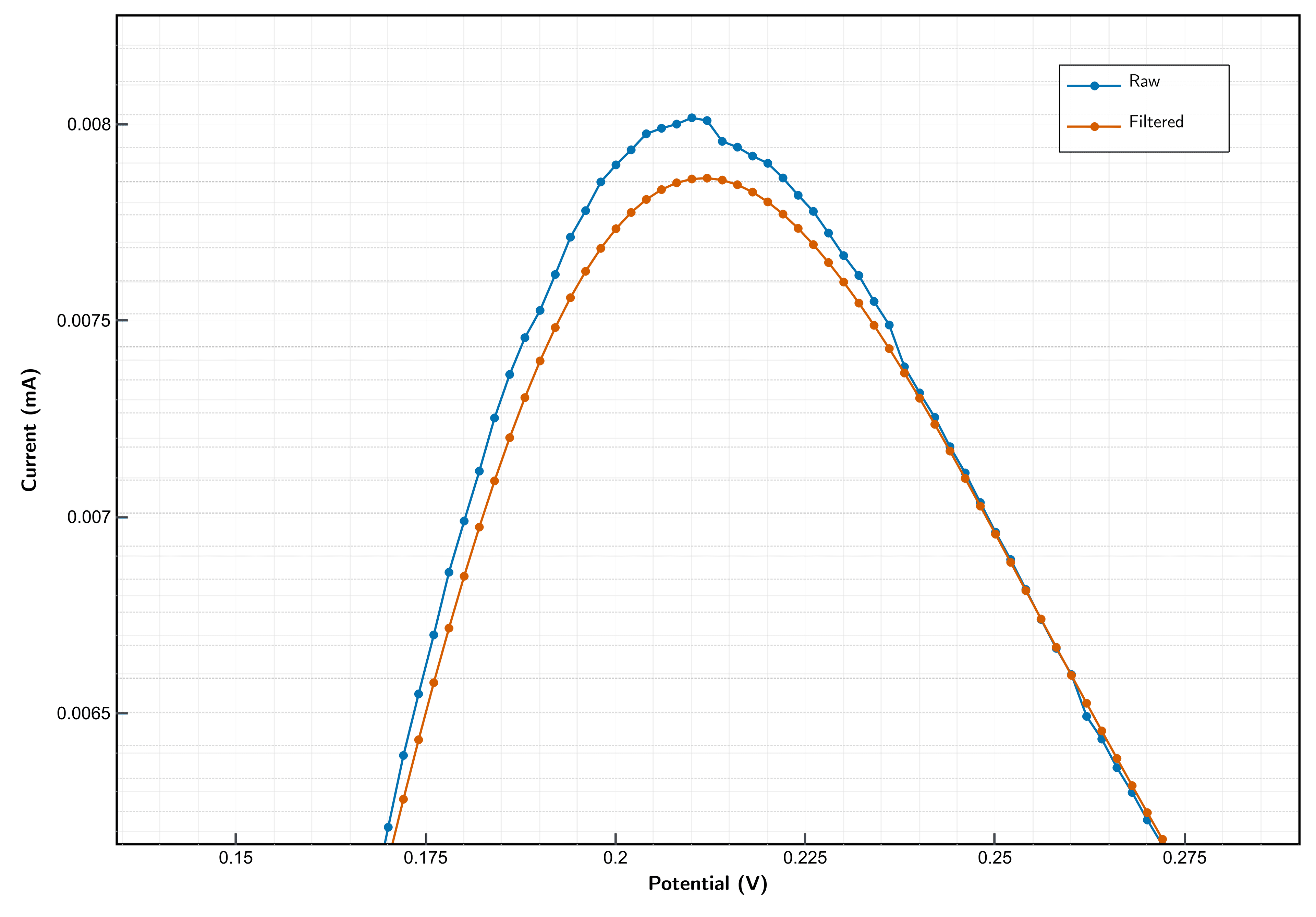
  3. 3Overlay the filtered trace on the raw to confirm the peak is not softened.
  4. 4Run peak finding on the filtered trace.
  5. 5Export raw and filtered side by side to preserve provenance.

Result

A cleaner trace where peak positions and widths are unchanged but baseline noise is cut by roughly a factor of two.

In Sensitify Studio

Filters run in Analyse → Filter. The filtered trace overlays the raw one so you can see whether the filter preserved what you care about. The raw data stays in the file.

Step-by-step in docs

Filter a signal