Skip to content
Sensitify
All analysis tools
Processing·Sensitify Studio

Integration

Integrate current over time or potential to extract charge, surface coverage, or coulombic efficiency.

Charge is the integral of current. Converting a current trace into surface coverage, deposited mass, or coulombic efficiency requires integration.

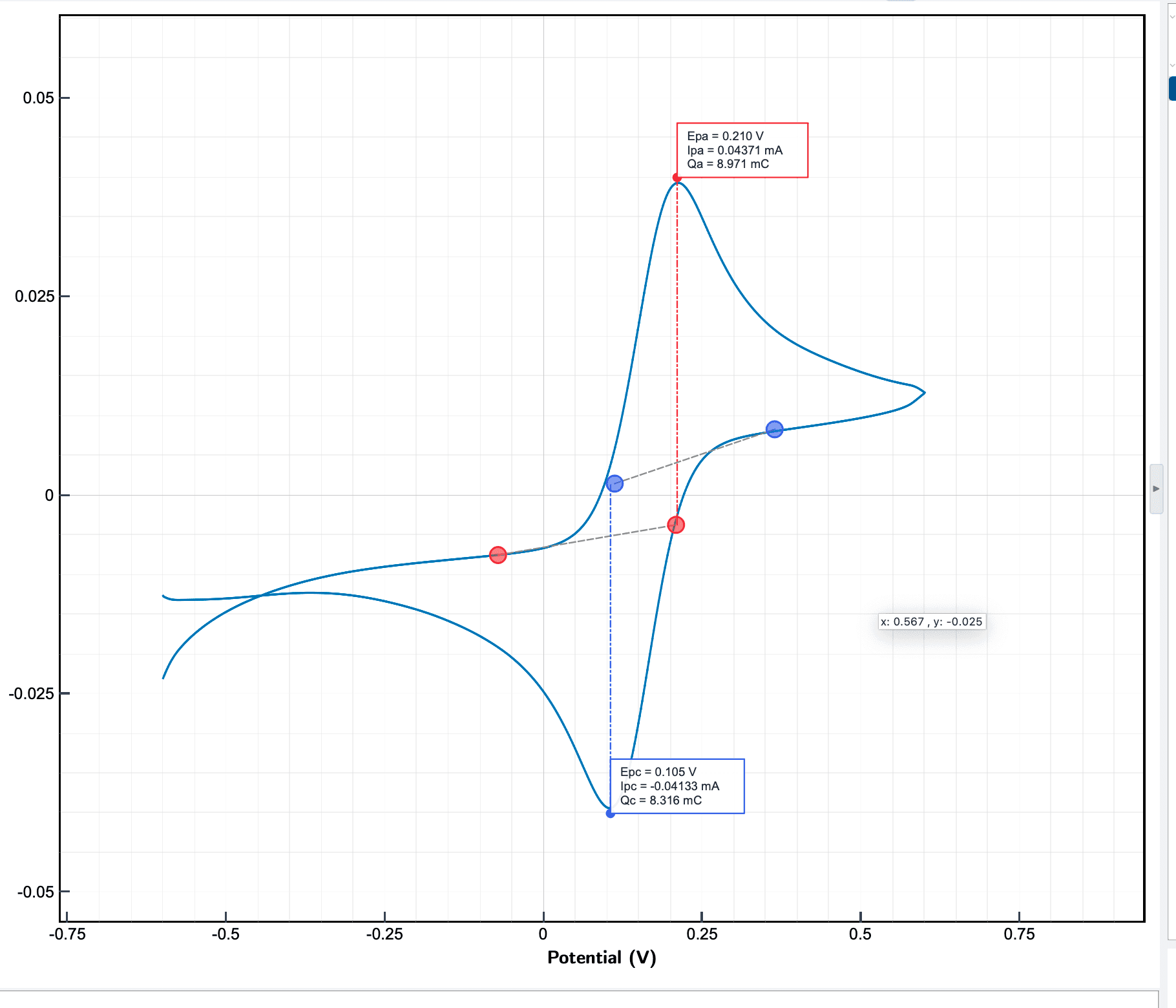
Studio integrates any region of any scan: a CV peak, a chronoamperometric transient, a galvanostatic half-cycle.

When to use it

How it works

Studio performs trapezoidal numerical integration over a region you select on the plot. The baseline under the region is subtractable (linear, tangent, or zero) so you integrate the faradaic part, not the capacitive background.

For CVs you can integrate with respect to time (gives charge in Coulombs) or with respect to potential (gives a volt-second quantity proportional to apparent capacitance). Studio reports both when it applies.

Sensitify Studio

Integration

Screenshot coming

Parameters you set

Integration bounds

Start and end of the region. Drag on the plot or type numeric bounds.

Baseline mode

Typical: Linear

Linear (two-point), tangent (slope-matched), or zero (no subtraction). Linear is the safe default for isolated peaks.

Integration variable

Typical: Time

Time (→ charge in Coulombs) or potential (→ volt-seconds). Applies to CV only.

Sign handling

Absolute charge or signed charge. Signed matters when net charge across a cycle is the quantity of interest (coulombic efficiency).

Example

Walkthrough

Surface coverage of a ferrocene self-assembled monolayer

  1. 1Run a slow CV (50 mV/s) over the ferrocene redox peak.
  2. 2In Studio, drag a selection across the anodic peak.
  3. 3Analyse → Integrate with Linear baseline and variable = Time.
  4. 4Studio reports Q in coulombs.
  5. 5Γ = Q / (nFA). For a 1-electron transfer on a 0.07 cm² disc, calculate accordingly.

Result

A numerical charge value with an uncertainty range from the baseline choice, ready for the Γ calculation.

In Sensitify Studio

Integration in Sensitify Studio is a drag-to-select on any plot, then Analyse → Integrate. The baseline overlay updates live as you change mode, so you can see exactly what is being subtracted before committing the number.

Step-by-step in docs

Integrate a peak