
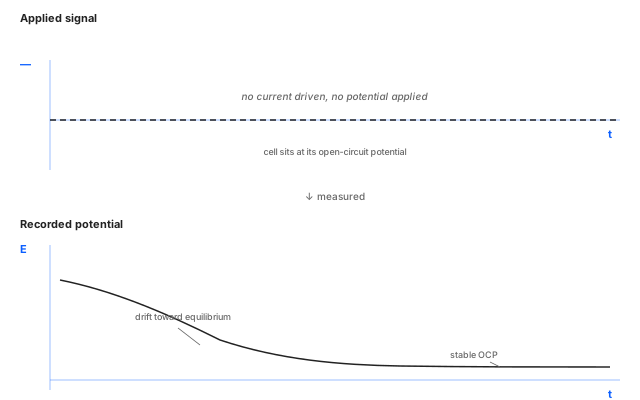
Potentiometry is a passive measurement: no current is driven and no potential is applied. The instrument records the cell's open-circuit potential against the reference electrode over time. It is used to monitor electrode drift, equilibration, ion-selective sensors, and the resting state of a cell before a driven experiment.
How it works
The instrument switches the cell into a high-impedance measurement configuration, disconnecting the working electrode from any current path so no faradaic process is forced. The voltage between the working electrode and the reference electrode is sampled at the configured rate and recorded as a time series. Because no current flows, the trace shows only what the cell itself is doing: drift toward equilibrium, response to a chemical change in solution, or the steady-state potential set by the dominant redox couple at the electrode surface.
Parameters
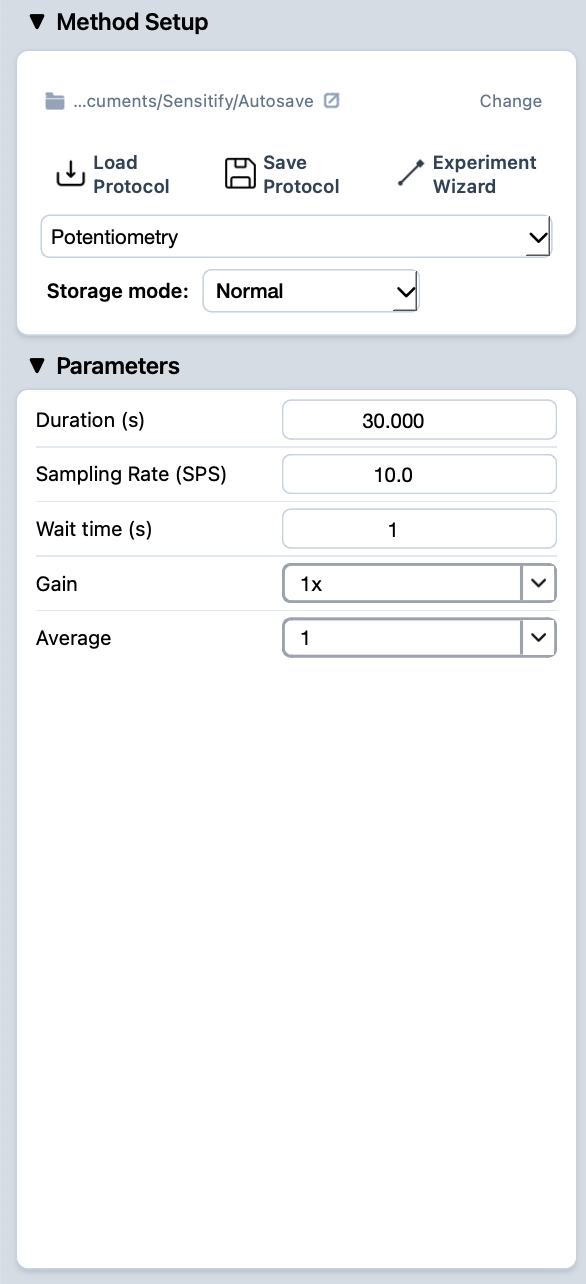
Duration (s)
- What
Total length of the recording. Sets how long the instrument samples the open-circuit potential.
- Typical value
A few seconds for a quick OCP read; minutes to hours when watching slow drift, ion-selective electrode response, or the equilibration of a fresh cell.
- When to change
Lengthen for slow processes (drift, contamination monitoring, long-term stability checks). Keep short when you only need a snapshot of the current OCP.
Sampling rate (SPS)
- What
How many samples per second the instrument records.
- Typical value
10 SPS or below for routine OCP work; the open-circuit potential rarely changes faster than that. Higher rates are wasteful unless the experiment expects fast transients (a chemical injection, a flow change).
- When to change
Raise the sampling rate when looking for fast transients (sensor response, mixing events). Lower it for long runs where only slow drift matters and you want a manageable file size.
Wait time (s)
- What
Pause before recording starts. Lets the cell settle before the measurement begins.
- Typical value
A few seconds for stable systems. Longer when fresh electrodes need real equilibration.
- When to change
Raise it if the start of the trace is dominated by an unsettled transient. Drop to 0 if you want to capture the very beginning of the equilibration.
Gain
- What
Front-end amplifier gain on the measured potential. Higher gain gives finer resolution at the cost of dynamic range.
- Typical value
The default, unless the expected potential range is much smaller than the default's full scale.
- When to change
Increase gain when the potential of interest is small (sub-100 mV swings) and resolution matters. Decrease when the cell could swing across a wide range and clipping is a concern.
Average
- What
Number of consecutive samples averaged into each recorded data point. Suppresses high-frequency noise at the cost of some time resolution.
- Typical value
A small value (4–16) for routine work, enough to clean up noise without smearing the signal.
- When to change
Raise it when the trace is dominated by short-wavelength noise. Drop it (or set to 1) when fast transients matter and you want every sample to land independently in the file.
Running it
- Connect the cell. See cell & electrode setup.
- Pick potentiometry from the Method Setup dropdown and fill in the parameters.
- Press the play button at the top-left of Studio. The Potentiogram tab opens automatically and the trace draws live.
- When the run finishes, the experiment appears in the right sidebar.
Reading the result
A potentiometric trace shows what the cell is doing on its own. Common shapes:
- Flat line. The cell is at equilibrium; the recorded value is the open-circuit potential.
- Smooth drift toward a plateau. The cell is equilibrating (fresh electrode, recently disturbed, or an ion-selective electrode responding to a sample change).
- Step transitions. Something changed in the cell during the measurement (an injection, a contact opened, the reference electrode dried out).
For closer inspection of a specific region, use the marquee zoom in the plot toolbar. To compare multiple runs, leave them all visible in the right sidebar.